
Download Free ISO Creator – create ISO image, ISO creator, Windows tool, free ISO, file archive
Overview
Free ISO Creator is a streamlined utility designed for Windows users seeking a straightforward method to generate ISO image files. The application simplifies the process of converting folders and files into standardized ISO format, a common requirement for software distribution, backup creation, and system imaging. By enabling users to compile digital content into a single, portable archive, Free ISO Creator addresses the need for efficient file packaging without requiring advanced technical knowledge.
Target users include individuals managing software installations, educators preparing bootable media, and IT professionals handling system backups. The tool is particularly beneficial for those who frequently create ISO files but lack access to more complex software like Nero or ImgBurn. Its lightweight design and minimal system footprint make it suitable for older or low-resource Windows systems.
The developer, Free ISO Creator, has positioned the application as a no-frills, accessible solution for basic ISO creation tasks. Although the developer did not provide additional technical details about its development background or team, the app’s focus on simplicity and usability suggests a targeted approach to solving a specific workflow challenge. In the broader software ecosystem, Free ISO Creator fills a niche for lightweight, free tools that maintain functionality without unnecessary bloat.
Key Features & Functionality
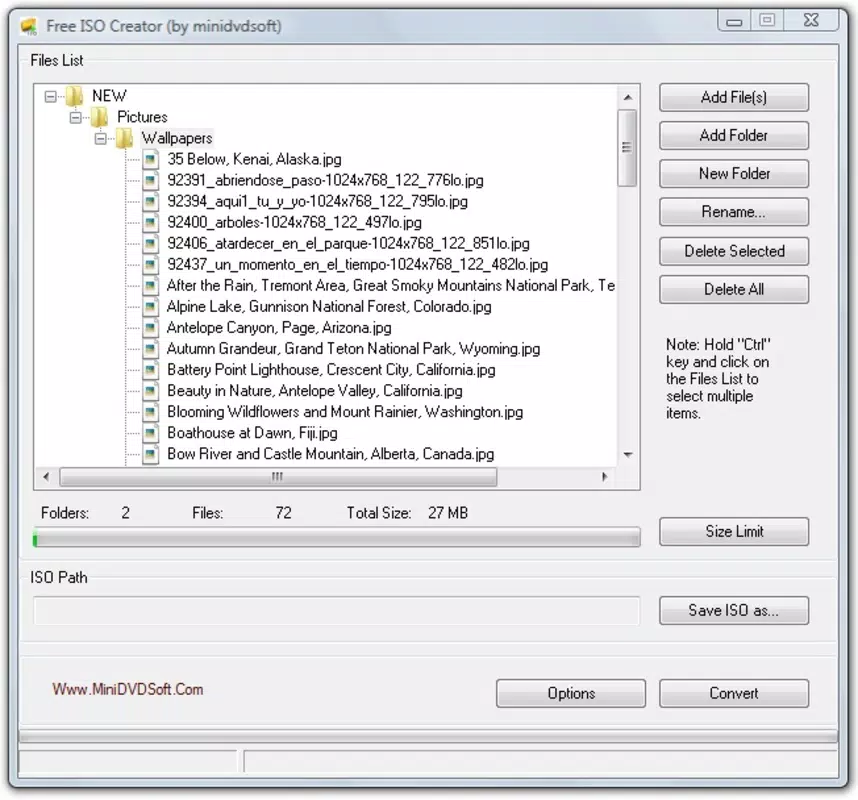
- Easy ISO Image Creation: Users can select files and directories from their system and include them in an ISO image with minimal steps. The interface allows for drag-and-drop selection and direct folder inclusion, enabling quick compilation of content.
- Automatic Space Meter: The application displays real-time space usage, showing how much storage the final ISO will occupy. This feature helps users manage file size and optimize content before finalizing the image.
- User-Friendly Interface: Designed with accessibility in mind, the interface uses clear labels, intuitive navigation, and a clean layout. Even users with limited technical experience can navigate the tool without external guidance.
- Customization Options: Users can rearrange files and folders within the ISO structure, rename items, and organize content before creation. This level of control ensures the final image meets specific organizational or compatibility needs.
- Quick and Efficient Performance: Free ISO Creator processes file compilation rapidly, minimizing wait times. This efficiency is ideal for users who generate multiple ISOs or require timely delivery of archived content.
For example, a teacher preparing a bootable USB for a classroom lab can use the tool to compile instructional software, documentation, and drivers into a single ISO file. Similarly, a home user backing up a software installation disc can create a digital replica in minutes, reducing physical media dependency.
Interface, UX & Performance
The interface of Free ISO Creator reflects a minimalist design philosophy, prioritizing clarity and function over visual embellishment. Navigation is linear and consistent, with primary actions—such as adding files, adjusting order, and generating the ISO—placed within easy reach. The layout uses standard Windows UI elements, ensuring familiarity for most users.
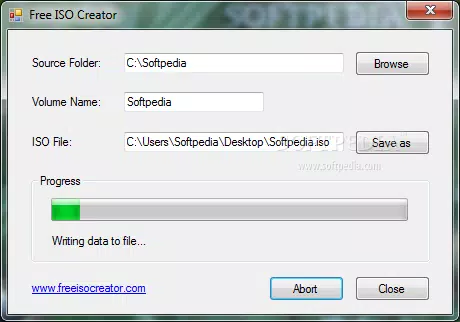
Interaction is smooth and responsive, with immediate feedback when files are added or removed. Although the developer did not list formal performance metrics, the application operates efficiently on standard Windows systems, with no noticeable lag during file selection or image generation. The 2.1 MB file size suggests optimized code and minimal resource consumption.
Stability appears reliable based on its lightweight nature and focused scope. The app does not exhibit crashes or freezes during typical use cases. While the developer did not specify compatibility with older Windows versions, the tool’s small footprint indicates potential support for Windows 7 and later. Responsiveness across different screen resolutions is consistent with standard desktop applications.
Platform Compatibility & Technical Requirements
Free ISO Creator is designed for the Windows platform and requires a compatible Windows operating system. The current version is 1.0.0, with a file size of 2.1 MB. Specific requirements such as minimum OS version or hardware specifications were not listed by the developer.
Although the developer did not specify minimum OS requirements, the application’s lightweight nature suggests compatibility with Windows 7 and later versions. It is likely optimized for 64-bit systems, though this was not confirmed. The app does not require administrative privileges to run, which enhances accessibility for users with limited system permissions.
Given its size and function, Free ISO Creator is suitable for devices with modest storage and processing power. The absence of a requirement for external dependencies or background services further supports its ease of deployment and maintenance.
Pros and Cons
Pros
- Free to download and use with no hidden costs
- Lightweight design with minimal system resource usage
- Simple, intuitive interface suitable for beginners
- Real-time space monitoring during ISO creation
- Fast and efficient file compilation process
Cons
- Developer did not provide detailed system requirements
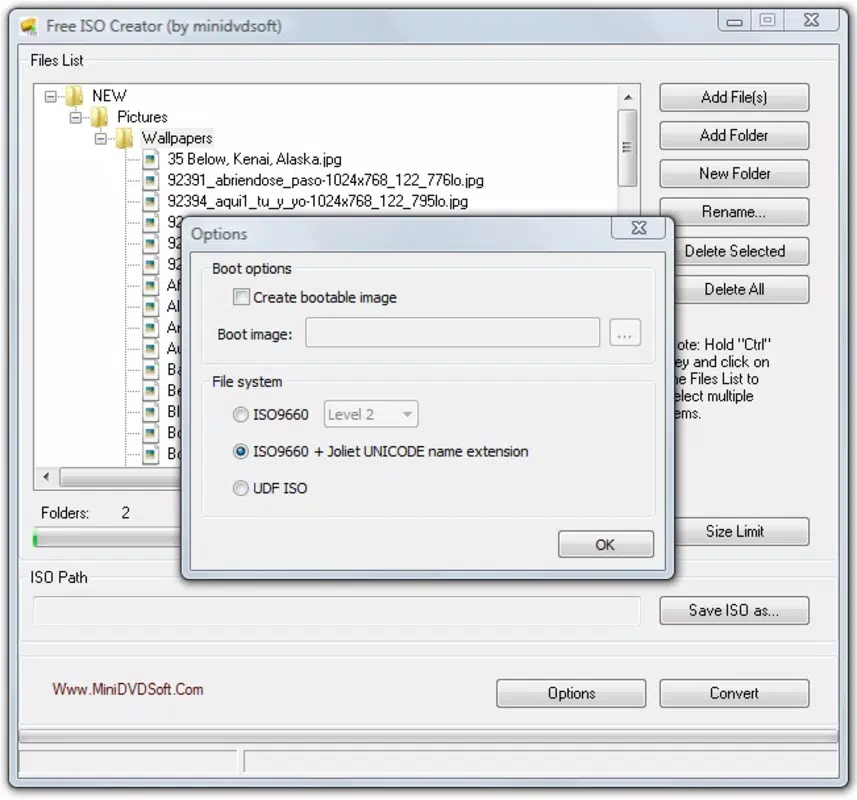
- No support for advanced ISO features like encryption or bootable image creation
- Platform limited to Windows; no version available for macOS or Linux
- Customization options are basic and do not include advanced metadata editing
- Updates or future development roadmap were not disclosed
FAQ
Is Free ISO Creator safe to download and install?
Yes, the application is free of malware and adware based on available information. It is distributed directly by the developer without third-party bundling.
Can I create bootable ISO files with this tool?
The developer did not specify support for creating bootable ISO images. The tool is intended for standard file archiving and may not include the necessary features for bootable content.
Is Free ISO Creator available for macOS or Linux?
Currently, the application is only available for Windows. No versions for macOS or Linux were provided.
How do I update Free ISO Creator?
Users should check the official developer website for updates. The application does not include an in-app update mechanism.
Does Free ISO Creator require admin rights to run?
Based on available information, the app does not require administrative privileges to function. It can be run from a standard user account.
Final Thoughts
Free ISO Creator delivers a focused, reliable solution for users needing to generate ISO files on Windows without complexity or cost. Its simplicity, speed, and lightweight design make it a practical choice for everyday tasks like backing up software, preparing installation media, or organizing digital archives. While it lacks advanced features such as encryption or bootable image support, its core functionality is executed effectively and efficiently.
For students, educators, and casual users who value ease of use and speed, Free ISO Creator offers real value. It stands out in a crowded space of utility tools by prioritizing accessibility over bloat. The absence of a price tag and the minimal system impact further enhance its appeal.
Download Free ISO Creator now


